
Introduction
Earlier we added our HTML for our products page and you may have noticed on our Add to cart button we included
a phx-click="add_to_cart" attribute. This set us up to handle that button click in elixir, and manage a cart full of products!
Add to cart
Using the awesome powers of phoenix generators again, we’re going to create a few schemas for our cart.
We’re going to create a Cart schema that will have many CartItem’s describing one Product.
First create our Cart schema —
mix phx.gen.schema Store.Cart carts status:enum:open:abandoned:completedThen create our CartItem schema -
mix phx.gen.schema Store.CartItem cart_items cart_id:references:carts product_id:references:products quantity:integerAdd a unique constraint to our cart_items migration so we can increment quantity later —
defmodule Amazin.Repo.Migrations.CreateCartItems do
  use Ecto.Migration

  def change do
    create table(:cart_items) do
      add :quantity, :integer
      add :cart_id, references(:carts, on_delete: :nothing)
      add :product_id, references(:products, on_delete: :nothing)

      timestamps()
    end

    create index(:cart_items, [:cart_id])
    create index(:cart_items, [:product_id])
+   create unique_index(:cart_items, [:cart_id, :product_id])
  end
end
Remember to migrate the DB to keep it up-to-date —
mix ecto.migrateWe need to add a query to list our cart items for our cart live view.
Update the CartItem schema to describe it’s association to Product so we can write a simpler query —
defmodule Amazin.Store.CartItem do
  use Ecto.Schema
  import Ecto.Changeset

+ alias Amazin.Store.Product

  schema "cart_items" do
    field :quantity, :integer
    field :cart_id, :id
-   field :product_id, :id
+   belongs_to :product, Product

    timestamps()
  end
end
Then add the needed context functions to the Amazin.Store content —
defmodule Amazin.Store do
  # ... Removed for brevity

  alias Amazin.Store.Cart

  @doc """
  Create a cart.

  ## Examples

      iex> create_cart()
      {:ok, %Cart{}}

  """
  def create_cart do
    Repo.insert(%Cart{status: :open})
  end

  @doc """
  Get a cart by id.

  ## Examples

      iex> get_cart(1)
      %Cart{}

  """
  def get_cart(id) do
    Repo.get(Cart, id)
  end

  alias Amazin.Store.CartItem

  @doc """
  List products in a cart.

  ## Examples

      iex> list_cart_items(344)
      [%CartItem{}, %CartItem{}]
  """
  def list_cart_items(cart_id) do
    CartItem
    |> where([ci], ci.cart_id == ^cart_id)
    |> preload(:product)
    |> Repo.all()
  end

  @doc """
  Add a product to a cart. Increments quantity on conflict.

  ## Examples

      iex> add_item_to_cart(1, %Product{})
      {:ok, %Product{}}
  """
  def add_item_to_cart(cart_id, product) do
    Repo.insert(%CartItem{cart_id: cart_id, product: product, quantity: 1},
      conflict_target: [:cart_id, :product_id],
      on_conflict: [inc: [quantity: 1]]
    )
  end
end
We need to ensure that a valid cart is always available for users. To do this, we’re going to write a custom plug —
defmodule AmazinWeb.Plugs.SessionCart do
  @moduledoc """
  Plug to ensure an open cart is assigned to the session.
  """
  @behaviour Plug

  import Plug.Conn

  alias Amazin.Store

  @impl true
  def init(default), do: default

  @impl true
  def call(conn, _config) do
    case get_session(conn, :cart_id) do
      nil ->
        {:ok, %{id: cart_id}} = Store.create_cart()
        put_session(conn, :cart_id, cart_id)

      cart_id ->
        case Store.get_cart(cart_id) do
          %{status: :open} ->
            conn

          _cart ->
            {:ok, %{id: cart_id}} = Store.create_cart()
            put_session(conn, :cart_id, cart_id)
        end
    end
  end
end
Then in your router, add it to the :browser pipeline —
defmodule AmazinWeb.Router do
  use AmazinWeb, :router

  pipeline :browser do
    plug :accepts, ["html"]
    plug :fetch_session
    plug :fetch_live_flash
    plug :put_root_layout, html: {AmazinWeb.Layouts, :root}
    plug :protect_from_forgery
    plug :put_secure_browser_headers
+   plug AmazinWeb.Plugs.SessionCart
  end

  # ... Removed for brevity
end
Next let’s wire up our product live view to handle adding items to a cart in the session.
Replace the mount function, add a new handle_info/2 function, and add the handle_event/3 function for adding to cart —
defmodule AmazinWeb.ProductLive.Index do
  # ... Removed for brevity

  @impl true
  def mount(_params, session, socket) do
    if connected?(socket), do: Store.subscribe_to_product_events()

    socket =
      socket
      |> assign(:cart_id, session["cart_id"])
      |> stream(:products, Store.list_products())

    {:ok, socket}
  end

  # ... Removed for brevity

  @impl true
  def handle_info(:clear_flash, socket) do
    {:noreply, clear_flash(socket)}
  end

  # ... Removed for brevity

  @impl true
  def handle_event("add_to_cart", %{"id" => id}, socket) do
    product = Store.get_product!(id)

    Store.add_item_to_cart(socket.assigns.cart_id, product)

    Process.send_after(self(), :clear_flash, 2500)

    {:noreply, socket |> put_flash(:info, "Added to cart")}
  end
end
Note how we pattern match on the name of the phx-click attribute, and we receive a map of any phx-value-* attributes.
On our button, we also added a phx-value-id attribute which is set to each respective product id.
We’re now ready to build our cart UI!
Cart Live View
The cool thing I’ve realized about live-view is even though I don’t have any “live” parts to this cart page, it’s still fine to build as a live-view because the overhead is minimal, and the semantics are awesome.
First thing we need to do is add a few routes pointing to some live-view’s we are going to create —
scope "/", AmazinWeb do
  pipe_through :browser

  get "/", PageController, :index
  live "/products", ProductLive.Index, :index
  live "/products/:id", ProductLive.Show, :show
+ live "/cart", CartLive.Show, :index
+ live "/cart/success", CartLive.Success, :index
end
Next let’s add a basic live view for the cart —
defmodule AmazinWeb.CartLive.Show do
  use AmazinWeb, :live_view

  alias Amazin.Store

  @impl true
  def mount(_params, session, socket) do
    cart_items = Store.list_cart_items(session["cart_id"])

    total =
      cart_items
      |> Enum.map(fn ci -> ci.product.amount * ci.quantity end)
      |> Enum.sum()
      |> Money.new()

    socket =
      socket
      |> assign(:cart_id, session["cart_id"])
      |> assign(:total, total)
      |> stream(:cart_items, cart_items)

    {:ok, socket}
  end

  @impl true
  def handle_params(_params, _url, socket) do
    {:noreply, socket}
  end
end
And then the HTML —
<div class="grid grid-cols-1 px-6 max-w-2xl mx-auto" id="cart_items" phx-update="stream">
  <h1 class="text-4xl pb-12 font-semibold">Your Cart</h1>
  <div
    :for={{dom_id, cart_item} <- @streams.cart_items}
    id={dom_id}
    class="cursor-pointer grid grid-cols-[8rem_1fr_auto] items-center border-b"
    phx-click={JS.navigate(~p"/products/#{cart_item.product}")}
  >
    <img
      class="p-6 object-contain"
      src={cart_item.product.thumbnail}
      title={cart_item.product.name}
      alt={cart_item.product.name}
    />
    <div>
      <%= cart_item.product.name %>
    </div>
    <div>
      <%= Money.new(cart_item.product.amount * cart_item.quantity) %>
    </div>
  </div>

  <div class="grid grid-cols-[5rem_auto] items-center py-10">
    <div class="font-bold text-xl text-right">Total</div>
    <div class="font-bold text-xl text-right">
      <%= @total %>
    </div>
  </div>

  <.button phx-click="checkout">
    Checkout
  </.button>
</div>
To test it out, let’s add some items to our cart from the products page, then click the cart icon and…
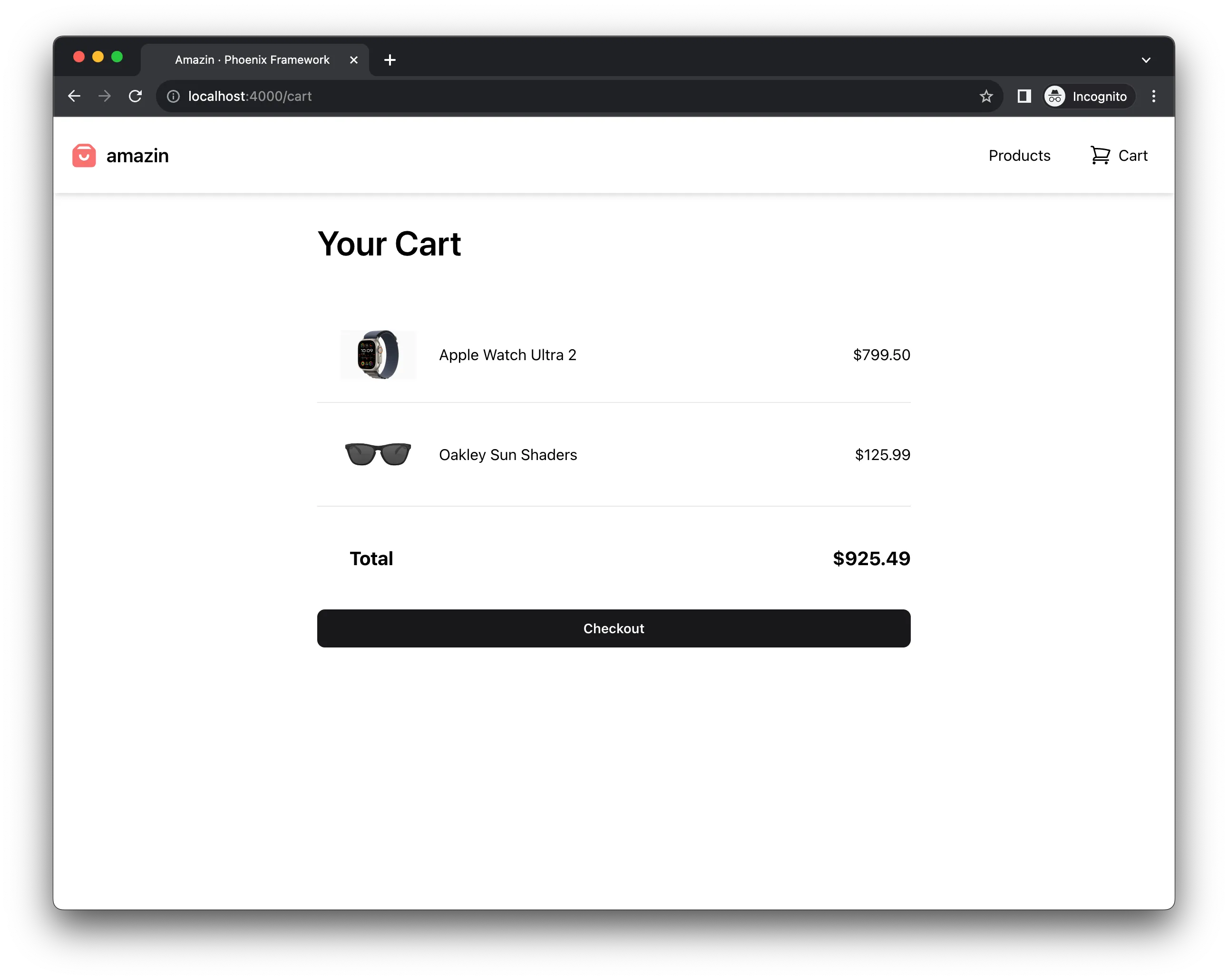
Amazing. Now we’re ready for the final strech.
Finished application on github.